Farming Simulator 26 Mobile APK – Android
GIANTS Software
May 19, 2026
2.19 GB
1.0.2
Android 9.0 or higher
100,000+
Video
Description
Farming Simulator 26 Mobile has officially arrived on Android platforms, bringing a highly detailed agricultural management experience directly to your Android device. Developed by GIANTS Software, this entry builds upon previous handheld editions by introducing a refined challenge system, deeper logistics, and a highly requested GPS steering feature. If you enjoy relaxed, methodical gameplay where you can watch a business grow from the ground up, this version offers a satisfying portable escape.
Gameplay and Key Features
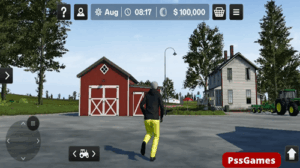
The core loop of FS 26 revolves around preparing fields, sowing crops, and harvesting your yields to turn a profit. This year, the developers added new crop types and a structured challenge system that rewards you for completing specific seasonal goals.
- Authentic Fleet: You can operate more than 120 meticulously detailed tractors, harvesters, and tools from real-world brands like John Deere, CLAAS, and Case IH.
- Production and Logistics: Instead of just selling raw grain, you can now manage production chains to turn wheat into flour or wool into clothing, adding a nice layer of business strategy.
- Animal Husbandry and Forestry: Beyond regular crops, you can care for livestock or head into the woods with heavy forestry machinery to log timber.
- New GPS Guidance: Driving straight rows can be surprisingly tricky on a touchscreen, so the new assisted GPS steering helps keep your field work clean and efficient.
How to Install FS 26 APK Android
Installing the premium game requires handling the APK file manually if you are opting out of the standard storefront.
- Ensure your device meets the minimum system requirements, particularly having around 2 GB of free space for a smooth installation.
- Download the Farming Simulator 26 Mobile APK file from this page (pssgames.com is a trusted, and verified source.)
- Open your Android device settings, navigate to Security, and toggle on “Install from Unknown Sources.”
- Locate the downloaded file in your file manager and tap it to start the process.
- Launch the game and allow any necessary storage permissions on the first run.
Tips and Gameplay Experience
When starting out, it is usually best to stick to basic crops like wheat or canola. They require less specialized equipment, which keeps your initial overhead low. The interface adapts fairly well to mobile screens, but utilizing the new GPS automation tool saves a massive amount of time during large-scale cultivating. One minor limitation is that the game can warm up older devices during long sessions, so lowering the visual settings slightly in the menu tends to stabilize the frame rate.
Safety Section
When downloading files outside of official app stores, safety should be your main priority. Always use well-known, community-vetted repositories to avoid modified files that might contain unwanted malware. It is highly recommended to scan the APK with an updated mobile antivirus tool before running the installation package.
FAQs
Can I play Farming Simulator 26 Mobile offline?
Yes, the core single-player career mode runs completely offline without requiring a constant internet connection.
Does the mobile version support community mods?
The mobile game features a curated ModHub directly within the menu where you can download official developer-approved community creations.
Are all vehicles unlocked from the start?
No, you begin with a modest starting fleet and must earn in-game currency by harvesting and selling goods to purchase advanced machinery.
Images